Simplify vendor onboarding, business bill pay, ACH and check payments, QuickBooks sync, payment tracking, and 1099 preparation in one connected workflow.

For a lot of businesses, AP workflows run in silos and depend on manual work. As payment volume increases, teams are still switching between emails, spreadsheets, and accounting tools, making the process harder to control. Then at year-end, vendor and tax records need a rushed cleanup.

W-9s, business details, invoices and payment history, sit across email threads, PDFs, spreadsheets, accounting systems, and bank portals.

There's no clear history and ownership of vendor payments. Teams have to juggle multiple systems to see what was paid, what's pending, or if anything needs review.

When systems aren't synced, vendor and payment details often get entered more than once across different workflows, which makes reconciliation harder down the line.
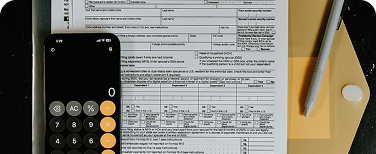
When contractor records, invoices, and payments aren't tracked consistently throughout the year, finance teams have to scramble during tax season to identify which vendors and payments are eligible for 1099 reporting.
Zenwork Payments helps businesses by combining vendor onboarding, payment approvals and execution, and 1099 preparation, all in one platform. Everything is connected for smoother vendor management and payouts with 1099 compliance, helping SMBs manage growing business needs.
Vendors can self-onboard through a secure portal where they can provide their information.
Collect information that vendors provide, such as business details, W-9 data, bank details, tax records, and payment information. Keep them organized before payouts.
Schedule and send individual or batch payments using the payment method that's best suited to the vendor workflow.
Monitor each payment’s status from initiation through completion while keeping vendor and payment records synced with QuickBooks.
Maintain reportable payments throughout the year so that eligible Form 1099-NEC and 1099-MISC drafts can be easily auto-populated and are ready for eFiling via the Tax1099 ecosystem during tax season.
Small businesses that are expanding benefit from AP automation, as it gives them the essential features they need while streamlining the process from vendor management to accounting updates to tax-ready records. Zenwork Payments does exactly that, making it easier to scale while reducing administrative workload.
Vendors get to self-onboard via a secure portal and manage their own information. These payment-ready vendor information (W-9s, business, contact and bank info) is stored to process future payments and tax records without much back-and-forth.
Schedule individual or batch payments via ACH or check, and track payment status, payment history, and approvals with immutable audit logs for each vendor without much hassle.
Keep all vendor, invoice, and payment information aligned using QuickBooks integration, so you don't have to juggle between systems, reducing duplicate data and manual uploads.
Connect W-9 information and 1099-eligible totals as payments are approved and released so that by the end of the year, 1099 preparation is easier and based on complete, organized data rather than last-minute rebuild.
Give vendors a self-service portal to keep their information current and pull up tax form details whenever they need to, so that teams spend less time with recurring inquiries.
Standalone business payment software can help send a payment, but it often leaves vendor information, accounting records, and 1099 preparation disconnected. Instead of treating vendor data as a one-time payment record, Zenwork Payments keeps it connected across onboarding, payment execution, accounting workflows, and tax reporting.
Vendor records stay part of the entire workflow, helping businesses maintain accurate records, simply 1099 compliance and manage vendor payments.
| Without Zenwork Payments | With Zenwork Payments |
|---|---|
|
Collect W-9s and payment details through email
|
Collect vendor, W-9, tax, and payment details upfront
|
|
Maintain vendor records in spreadsheets
|
Maintain a consolidated payment-ready vendor record
|
|
Pay through a separate bank portal
|
Send ACH and check payments from a connected workflow
|
|
Check multiple systems for payment status
|
Track payment status and history centrally
|
|
Update accounting records manually
|
Keep relevant records synchronized with QuickBooks
|
|
Rebuild 1099 information at year-end
|
Maintain tax-ready payment info all year round
|
|
Approval details and audit trails may be
altered or difficult to verify
|
Approval records and audit trails are
securely logged, creating a clear,
traceable history for every transaction
|
Use Zenwork Payments to connect vendor info, payment details, and tax-ready records with the finance systems your team already uses. QuickBooks remains your accounting system of record while payment activity stays synchronized.
QuickBooks Online
QuickBooks Desktop
Payer & Vendor Setup
Bills / Payments Capture
Zenwork Payments
Payment & tax-readiness layer
Approval Workflow
1099 Ready
Tax1099
Preparation & e-filing
Use one connected workflow to manage vendors, send ACH and check payments, sync QuickBooks records, track payments, and stay prepared for 1099 reporting.
Zenwork Payments helps growing businesses create a more structured process for vendor management, accounts payable, payments and 1099 readiness. You could manage multiple vendors with a lean finance team, replacing spreadsheets and manual bill pay, or keeping QuickBooks at the center of accounting, Zenwork Payments connects the entire workflow in one place.
See what’s been paid, what still needs attention and how vendor activity is progressing without tracking transactions across different systems.
Collect vendor information, send payments, and track payment and approval activity through a repeatable process instead of relying on spreadsheets, emails, and manual follow-ups.
Maintain clearer oversight as vendor and payment volume grows with connected vendor and payment records to support accounting, reporting as well as year-end tax prep.
Keep W-9 information, contractor records and reportable vendor payments organized throughout the year.
Add a connected vendor payment and 1099-readiness workflow while keeping QuickBooks Online or QuickBooks Desktop at the center of accounting.
AP software supports small businesses with smooth vendor onboarding and payment-ready records, approval workflows, payment options (ACH/check) and payment status tracking. Zenwork Payments also helps connect these with W-9 collection, TIN matching, QuickBooks data sync and 1099 prep.
Yes, absolutely. With Zenwork Payments, businesses can store payment-ready vendor records, send payments securely via ACH/check, track payment status and payment history, as well as schedule and manage batch payments, all in one place.
Yes, AP automation reduces manual work by creating a more organized and consistent workflow for vendor data management, making payments, tracking statuses, and Quickbooks updates, so teams get more time to focus on strategic work.
No, Zenwork Payments works with QuickBooks Online and QuickBooks Desktop to connect vendor and payment data to your accounting system.
Businesses can be tax-season ready with Zenwork Payments as vendor tax details are collected at onboarding and connected with reportable payment activity which keeps tax data up to date throughout the year. Accurate records aid smoother 1099 reporting.
Yes, they can self-onboard using a secure vendor portal (xForce). They can add or delete their information, access payment records and tax form details, cutting down follow-up inquiries.
Keep your existing accounting tools while streamlining vendor onboarding, payments and 1099 compliance.
Ready for a Free Trial? Get a Demo